> ## Documentation Index
> Fetch the complete documentation index at: https://docs.lovable.dev/llms.txt
> Use this file to discover all available pages before exploring further.
# Using npm packages
> Add drag-and-drop, charts, animations, and other advanced features by asking Lovable to integrate npm packages into your project.
Every Lovable project can use npm packages, ready-made JavaScript libraries for features like drag-and-drop, charts, animations, and date handling. You do not install anything yourself. Name the package in chat, or just describe the feature you want, and Lovable installs the package and wires it into your app.
**What is npm?**
npm (Node Package Manager) is the public registry where JavaScript developers share reusable code. It hosts thousands of packages that you can integrate into your projects to extend functionality. You can browse it at [npmjs.com](https://www.npmjs.com/).
## Ask for a package in chat
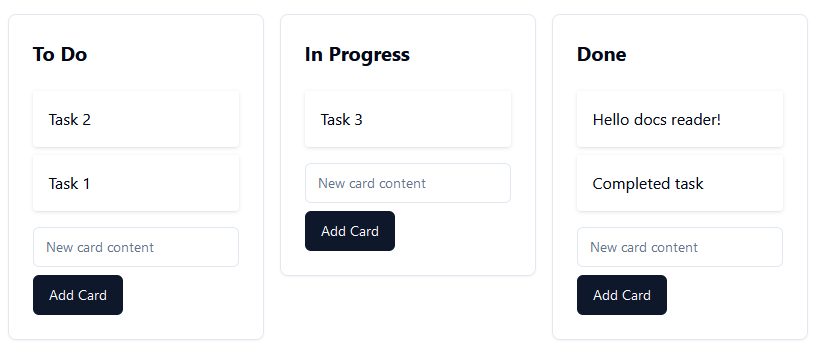
Say you want to arrange tasks in Kanban boards, like in popular project management tools. You can prompt Lovable to build drag-and-drop from scratch, but a dedicated package gets you robust behavior faster. For example, [@hello-pangea/dnd](https://www.npmjs.com/package/@hello-pangea/dnd) provides drag-and-drop functionality that supports adding cards, moving them between columns, and reordering them.
```text wrap theme={null}
Use the @hello-pangea/dnd npm package to add drag-and-drop functionality to my Kanban board app. Ensure users can add new cards, move them within columns, and reorder them.
```
Lovable installs the package and integrates it into your project. Depending on your other requirements, the result might look like this.
 You can also describe the outcome without naming a package ("add drag-and-drop to my board"). For well-established problems like this, Lovable prefers proven libraries over hand-rolled code and picks a suitable package for you.
## Choose packages carefully
Lovable installs any public npm package you ask for, but it cannot guarantee the quality, security, or reliability of third-party code. Test features built on a package thoroughly before you rely on them.
Before integrating a package, check:
* **Downloads**: A high download count on the package's npm page indicates the package is widely used and trusted by the community.
* **Maintenance**: Look at the package's repository. Frequent commits, recent releases, and responsiveness to issues are good signs. A package that has not been updated in years is more likely to break with current dependencies and security practices.
* **Community feedback**: Read issues and discussions on the package's GitHub repository, and search developer forums for reports of problems.
Also keep in mind that Lovable apps run in the browser with a serverless backend. Packages built for other environments, such as Electron (desktop apps) or Capacitor native plugins (mobile apps), install without errors but do not work in your published app.
## FAQ
No. Ask for the package or the feature in chat and Lovable adds it to your project's dependencies. There is no terminal step or manual `package.json` editing.
Ask in chat. Prompts like "remove the moment package" or "update recharts to the latest version" work the same way as installing.
Yes, on the Enterprise plan. Set up a [private registry](/features/private-registry) for your workspace to publish internal packages and install them in any workspace project.
`bun.lock` (or `bun.lockb`) belongs to Bun, the tool Lovable uses to install packages. It records the exact version of every package in your project so your app builds the same way everywhere. You can see it in your project's code files, and in your repository if you sync the project to GitHub. Leave the file in place. If you run the project outside Lovable, install dependencies with Bun so the versions stay in sync.
You can also describe the outcome without naming a package ("add drag-and-drop to my board"). For well-established problems like this, Lovable prefers proven libraries over hand-rolled code and picks a suitable package for you.
## Choose packages carefully
Lovable installs any public npm package you ask for, but it cannot guarantee the quality, security, or reliability of third-party code. Test features built on a package thoroughly before you rely on them.
Before integrating a package, check:
* **Downloads**: A high download count on the package's npm page indicates the package is widely used and trusted by the community.
* **Maintenance**: Look at the package's repository. Frequent commits, recent releases, and responsiveness to issues are good signs. A package that has not been updated in years is more likely to break with current dependencies and security practices.
* **Community feedback**: Read issues and discussions on the package's GitHub repository, and search developer forums for reports of problems.
Also keep in mind that Lovable apps run in the browser with a serverless backend. Packages built for other environments, such as Electron (desktop apps) or Capacitor native plugins (mobile apps), install without errors but do not work in your published app.
## FAQ
No. Ask for the package or the feature in chat and Lovable adds it to your project's dependencies. There is no terminal step or manual `package.json` editing.
Ask in chat. Prompts like "remove the moment package" or "update recharts to the latest version" work the same way as installing.
Yes, on the Enterprise plan. Set up a [private registry](/features/private-registry) for your workspace to publish internal packages and install them in any workspace project.
`bun.lock` (or `bun.lockb`) belongs to Bun, the tool Lovable uses to install packages. It records the exact version of every package in your project so your app builds the same way everywhere. You can see it in your project's code files, and in your repository if you sync the project to GitHub. Leave the file in place. If you run the project outside Lovable, install dependencies with Bun so the versions stay in sync.